Project Feedback

by | | 0 comments
I had the opportunity to show my final project to the sophomore design studio. The students range from 19-22 years old, so they are emblematic of the 18-24 year old demographic group I am designing for. I was anxious about how this audience would respond to a potentially annoying tool (that encourages you think about the information you post) being integrated into their social networking site. While I expected friction from students, the results were unbelievable.

I gave the students a survey before I showed my project, to get some baseline feelings/demographic data, and a survey after I presented my interactive prototypes. Below are some screenshots from the second survey.


Every single person in the class would adopt fb-minder now or in the future! Unbelievable. And while they enjoyed the added transparency to their social interactions, the students also saw the value in being conscious about information they output. I also got some new ideas for what fb-minder could do that I hadn't thought of before. While I know that a survey of 14 people does not prove that my system actually works, it was gratifying to get this kind of feedback at the end of my final project. What better way to finish graduate school...

Interactive Visual Study

by | | 0 comments


I have part of my first visual study simulated for the web, but it's still a work in progress. There is a yellow glow that indicates Charly's user path, so it might be possible for someone to go through the scenario without me (but gets tricky if you don't click in the right spot). Initially, when I was working with pdf slides, I was having trouble getting across the dynamic idea in a static format. Creating the interactive user path allows my cognitive artifact to present more clearly, with the yellow glow directing attention to what the participant is doing in the scenario.

Thesis Paper Writing

by | | 0 comments


I started my thesis paper with an outline that mirrored my process, but I didn't anticipate how uninformed this approach was. For instance, when I introduced my sub questions was I supposed to discuss how they embodied the properties of networked publics, or save that for later? Feeling stilted by this lack of clarity, I decided that my outline needed to be re-approached.

My problem isn't that I don't understand my thesis topic enough to write about it, because I do. Instead, I have too many ideas in my head that wont come out in a logical order. Frustrated, I went to the computer lab and pulled scrap paper from the trash to slice down. Afterwards, headed to a beautiful sunny spot on a swinging bench to purge. Unconcerned with where it would show up in the paper, I just wrote down keywords and concepts that I wanted to discuss. I would skip around the whole project remembering bits and pieces that were pertinent to my outcome. When I tried to organize these scraps of paper later, I found it difficult and overwhelming to maneuver, so I opted for post-it notes—which I usually avoid because it seems so wasteful.


I started transferring the ideas from scraps of paper to post-its on the wall in my apartment. This was very difficult because I had to make decisions about hierarchy that weren't clear to me yet. Thankfully, I pushed forward and finished, so I will find out today if this clarity improves my writing process. Wish me luck!

Visual studies [moving forward...]

by | | 0 comments
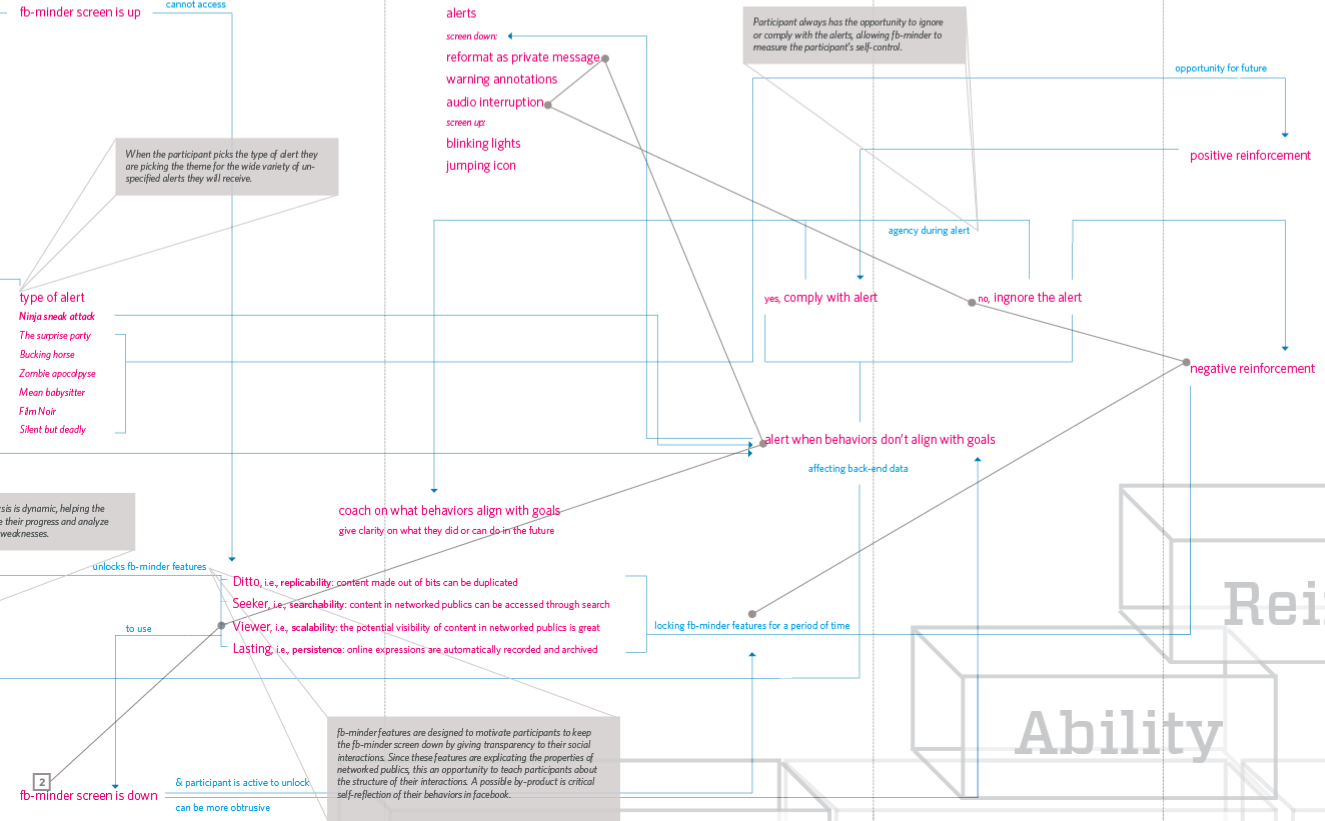
Having started visual studies 01 and 02, I had the groundwork to start mapping the system I am designing. Being such a visual learner, I noticed that I had to "do" and then "synthesize", instead of the other way around. This map answers the question, "What is the system doing to help the participant through the Adkar model of change?" Moving forward, I have three more studies that I want to complete [see interaction paths below] that will help me build out my map further.

System Map
System Map


visual study 01 - interaction path
The participant customizing the back-end of the artifact.


visual study 02 - interaction path
The participant using the Viewer feature and not complying with the alcohol related alert.


visual study 03 - interaction path
The participant using the Ditto feature and complying with the security risk alert.


visual study 04 - interaction path
Participant minimizes the screen and ignores alerts.


visual study 05 - interaction path
Participant goes to the back-end of the program to look at affected data.

user-path/scenario #1

by | | 0 comments
I am working towards my first visual study by concreting my user-path/scenario. For this first moment, I am looking at Charly Dawson's introduction to the cognitive artifact (aptly named fb-minder). I am going to speculate on how Dawson learns about the artifact, is engaged to participate, and starts customizing the artifact towards her behavioral goals. I am also hoping to use this opportunity to teach her about persistence—informing her decision to change.

USER-PATH


SCENARIO
Charly Dawson is a 24 year old female college student who graduates with her Bachelor of Education this May. She has been an avid online social networker since 2005, but participates in Facebook the most. Charly finds time to visit Facebook everyday of the week, multiple times a day.

...

This Saturday morning Charly rolls out of bed and instantly gravitates to her desktop computer to look for any updates in her e-mail and Facebook accounts. When she logs onto Facebook 01 she notices a new feature called fb-minder being announced on the homepage. Curious, Charly clicks on 02 the link to find out more. Seeing no harm, Charly 03 activates fb-minder to run an analysis on her data. Before it starts, 04 Charly is asked to answer a few provoking questions to personalize her analysis, which heightens her anticipation as she waits for the results. Charly stares at the 05dynamic visual indicator of fb-minder's progress, which gives her insight into which information is being accessed; she can see which touch-points the data is coming from, and how much is stored there. Charly is shocked to see six years of social interactions strategically compiled right before her eyes.

When 06 the information has finally loaded, Charly is excited about the screen that drops down to overlay the interface, clearly activating fb-minder. 07 The icons and visuals that compose her new environment are enticing, and she instantly accesses her 08 aggregated information to 09 explore what fb-minder has to offer. She notices 10 the screen and information below adapt and change as she clicks through her data.

Charly can clearly see from the information on the page that 11 fb-minder is ready to help her in a variety of ways. As she comes across an embarrassing old status, 12 Charly asks fb-minder to let her know how many times she has put out a status like this, and to alert her if she ever does so again. 13 Fb-minder begins to clarify what Charly's intentions are for tagging that piece of information.

...

designing for experience

by | | 0 comments
After my committee meeting yesterday, I feel confident that the foundation of my research is sturdy enough to start exploring visually. This move forward is slightly involuntary at the moment, because I know that there are still blind-spots in my data, but I am excited about working concretely.

This week, it is important that I create a scenario with my persona—to define parameters—and develop visual studies. The earlier I can get feedback, the earlier that I can make improvements, and the earlier I can start writing analytically. Phew.

The big question that my project has turned into is: How could a cognitive artifact engage participants of online social networks to think about behavioral changes they would want to make, assess what those personal goals are, and then encourage them to meet and sustain those goals?, which essentially means: How could my cognitive artifact take the participant through the Adkar model of change?

Accordingly, I chunked my big question into four different visual studies that I could do. For the purposes of this time frame, I am going to be speculating on Visual Study 02 and Visual Study 03, as seen below. There is something interesting about the point when the participant tells the artifact what their goals are, and then when the artifact helps them during a potential step away from that goal.


01. WHY
EMOTIONS AND NEEDS THAT NEED TO BE ADDRESSED


After pinpointing where my time will be spent until May, I wanted to take steps towards a user-centered design process. I went through the Adkar model of change and listed what the participant should ideally be feeling during each step in the process.


Awareness
+ curiosity
+ reassurance
+ guidance
+ secure

Desire
+ motivated
+ sure of myself
+ committed
+ relieved that there is help
+ necessity

Knowledge
+ safe
+ control
+ clarity
+ competent
+ prepared

Ability
+ don't feel self-conscious
+ I appreciate the coaching
+ I feel safe and guided, like my best interests are at heart
+ don't feel attacked
+ comfort in invisible bumper guard
+ still feel in control
+ truly not surprised because the artifact is doing exactly what I expect
+ encouraged that I will remember next time

Reinforcement
+ appreciate that it noticed
+ personal gratification
+ enjoy visual indicator of progress
+ anticipation and surprise
+ never gets old

Afterwards, I looked for themes in the moments that I will be speculating for: Awareness and Knowledge. The three themes I noticed were safety, control, and appeal. I wanted to understand what it meant, from a system's standpoint, to facilitate the participant's optimal experience.

Safety Safety*
+ secure information
+ unjudgemental
+ credibile
+ dependable
+ reassuring

Control Esteem*
+ easy
+ clarity
+ no surprises
+ ability to opt-out
+ full agency
+ full transparency
+ respectful
+ customizable

Appeal
+ visually attractive
+ functional
+ not obtrusive to SNS
+ tolerable interruptions
+ variety, anticipation
+ cater to curiosity
+ ease of use
+ fun

* Maslow's Hierarchy of Need


02. WHAT
WHAT YOU CAN DO WITH IT


+ have your social networking experience mediated
+ assess your goals
+ be alerted of behaviors that do not align with your goals
+ have your behaviors visualized
+ be helped to change behaviors
+ customize the artifact to fit your needs
+ have the meaning of your language input understood


03. HOW
HOW YOU INTERACT WITH IT


mediating
+ opt-out
+ direct hub
+ transitions to overlay

assessing
+ give concrete examples
+ see how the artifact understands my goals
+ manipulate dichotomized variables
+ refine

alerting
+ agency to listen or not
+ can be audio or visual
+ can either interrupt, be periphery, or temporal
+ I am aware that the artifact is activated
+ can control emphasis

visualizing
+ can control variables
+ can easily be read
+ can access deeper levels of information
+ can "wipe slate clean"

customizing
+ intuitive
+ quick
+ see change immediately
+ clarity
+ quickly enter/exit

understanding
+ guide
+ enter into a dialogue
+ debate meaning

system map/research poster

by | | 0 comments
This is what I developed to have a visual conversation with my committee members on my up-to-date research.

The poster can be seen in it's entirety on Scribd.

research_poster